Greetings
2 Likes
Good afternoon everyone.
2 Likes
I spoke to a young colleague about the Y2K bug and how I was on standby on New Year’s Eve 1999 because of it.
She said “Yeah! We learnt about that in HISTORY class!”

2 Likes
haha yup… watched a documentary last night with Cody about 9/11 and that made me feel ancient.
3 Likes
Yeah, wife and I was buying Pizza in PMB when we saw it happen on a TV in the Pizza shop. A memory I will always have burned into me.
3 Likes
I remember watching Pokemon when my dad came home and changed the channel to see the second tower being hit.
3 Likes
My son took part in a Grade 8 public speaking festival last year - as part of a school team. And the one team from KES spoke about the 2010 World Cup and I had this sudden realisation that none of them were even born then (they’d have been born in 2011)
Man did I feel old then because the 2010 World Cup does not seem that long ago 
3 Likes
Yeah omg. My son was born in 2012 and the World Cup doesn’t seem that far away to be honest.
My little son has seen and understands that “this is bullshit” meme and now goes around saying it.
2 Likes
I remember coming home from one of my finals and seeing it happening on tv.
1 Like
Good morning, a very wet morning in cape town
3 Likes
Good morning MEW.
3 Likes
Good morning people of the palace
it seems the rain has kept all my staff at home today its just me and the cleaner and one other guy
1 Like
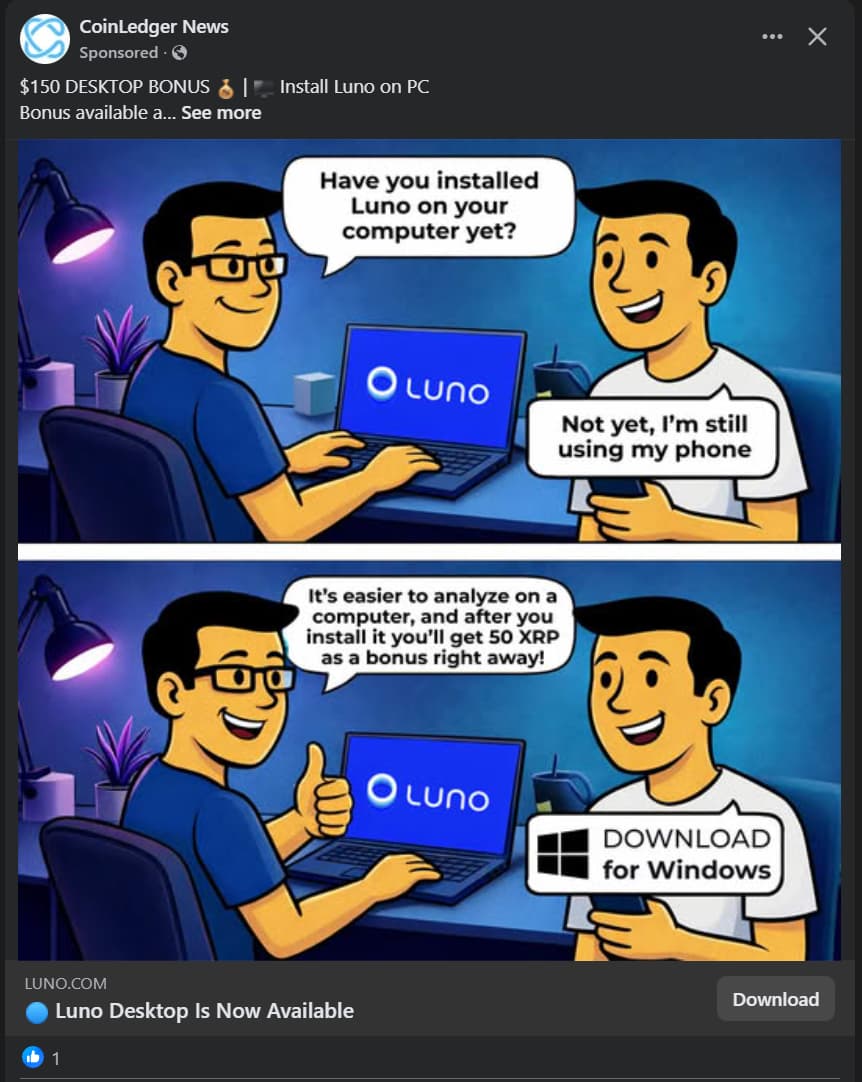
Hi all, for the sake of warning others I will happily admit that to my shame I was tricked by this ad and landed up installing the Luno “desktop app”. Thinking I’d check out the app and grab the 50XRP bonus I foolishly downloaded and installed the program. It does create a web app that links to Luno - so it seemed legit, i.e. didn’t trigger any alarm bells at the time. I tried to redeem the bonus XRP but it told me I needed to verify my account - despite already having a verified account. I figured it was a bug and forgot about the app.
I then started having a some strange issues on my PC - but never thought that it might be related to this Luno desktop app I’d installed. Firstly my Memory usage was unusually high (hovering around 48-50% of 32GB) - it was Microsoft Edge (which I don’t use as a default browser) that was hogging a large portion of resources. I did some investigating and it appeared to me that it might be Xbox Game Assist
Microsoft Edge Game Assist (on PC) or simply the Edge App (on console), provide a way to access guides, walkthroughs, and social apps without leaving a game. This tool acts as an in-game browser designed to help players navigate, check progress, and chat.
I had been using that feature for finding some of the collectibles in Indiana Jones on Game Pass. It did seem a steep cost to pay in memory for having that feature available in-game (even when not playing). Figured they’d fix that in an update or something. In retrospect - it was probably the Trojan virus introduced by the fake Luno app.
The big issue I had was that my Microsoft Store stopped working - it would keep saying that the store was not available - try again. It wouldn’t have immediately been a problem except for the fact that the Xbox App for Game Pass is dependent on the MS Store to be able to download and install games, or even have online connectivity. Queue a long process of following every guide to repair or reinstall the MS Store, including Powershell commands, Windows reset (while preserving apps and files)
Finally I decided that the only option was a full clean reinstall of Windows. I backed up the necessary files and folders and set to creating an installation USB. It was after the installation media usb had been created that Windows Defender started pinging with a detection. On the installation USB it was detecting a Trojan [ Trojan:PowerShell/Boxter.HCA!MTB] in an autounattend.xml
What this essentially meant is that if I reinstalled Windows from this USB it would run the unattended installation command (installation where you don’t have to select options) and as part of the installation insert this trojan which seems to be one of those that install a backdoor crypto mining app. Likely the very same app I have unwittingly installed via the fake Luno App.
The high memory usage was therefore the Trojan utilising part of my memory to remote mine for the hackers. The MS Store error was a symptom of the infection of the virus. And this nefarious code would self propagate itself into a new install of Windows using the autounattend.xml it creates when detecting a windows installation media USB.
[Edit: When the virus had been pinged by Windows Defender I did also run Malwarebytes to see if I could detect anything on my system but it didn’t come up with anything conclusive. And certainly nothing relating to the Luno App]
Luckily - even though I hadn’t yet worked out how my PC had been compromised - I knew that I could not use the Installation Media USB to reinstall and instead formatted the drive - and then used my laptop to create the installation media USB. Using this “clean” copy I reinstalled Windows and solved the problems.
Finally, I recently received an email from Luno (the real Luno) warning about scams and specifically I had the above image and warning that there is NO Luno Desktop app. When I saw that the pieces all clicked into place and I realised my stupidity. I changed my Luno password - thankfully I had no funds of note to steal - although I doubt that was the hackers objective anyway.
TLDR - DO NOT INSTALL THE LUNO DESKTOP APP - IT IS FAKE AND INSTALLS A TROJAN ON YOUR PC WHICH USES YOUR MEMORY TO MINE CRYPTO
7 Likes
I see you also follow the security through obscurity poverty method.
5 Likes
They can’t steal what I don’t have 
1 Like
I thought we all lived like that.
In other news, its really feeling like this HR investigation is being framed around me taking the blame/fall.
1 Like
Keep all correspondence records. Maybe chat to a CCMA rep for advice on your rights. It doesn’t mean that you have to go that route but it might be worth being informed.
3 Likes
I completely agree on this
Also hi all
feels like I finally caught the cpt flu that is doing the rounds
1 Like
Good Morning everyone.
2 Likes