Check iCloud syncing. It might be that Outlook does an import to a calendar, and iCloud syncs calendar events, which might cause duplicates to be created. My wife had a similar issue years ago, even happening with OneDrive / iCloud file duplication. So check if iCloud syncing is on and, if it is, turn it off for calendar syncing and see if the duplication still happens.
I try my hardest to avoid having any MS products on my Macbook and really dislike their patterns. Nevertheless, I have a similar experiences but not importing, and don’t use iCloud mail or calendar. I have noticed a delay, and sometimes causes duplicates to occur, when using Outlook calendar with a Microsoft 365 account when syncing between cloud and local.
unfortunately this is for a client, and they have swapped everyone over to MS365 email accounts, and out the whole company only the boss uses the Mac, and the problem is only on his device, nowhere else.
I would have loved it to never have to deal with MS products on mac, but unfortunately this is where we are at sigh…
Will see if client will allow me to give that a shot. My knowledge of apple devices is quite low but as far as I saw, icloud calendar does not sync natively with outlook for mac, if there is a place where I can go look too see that is whats happening then it might also lead me to a solution.
The calendars sync fine on a test outlook we have on windows, its perfectly fine on outlook for web, no duplicates there, only on his one mac device, and its only on one calendar we imported, he has like 7 calendars so he can categorize and share only certain calendars to certain employees, and only this one has the issue.
I have even removed and imported the calendar again, and it stays fine for like a few seconds, then in front of my very eyes it just duplicates, I honestly just feel like giving up and telling them just to delete the duplicates as they find them, but sigh I know you can’t really talk like that to a client.
This may just be me, but if this were to have happened to me, I would honestly just get on with my life XD, there are more important things to worry about than one calendar duplicating
1 Like
Of course it is. When I was in IT support this was always the case, I’m glad that Murphy is still alive and well.
2 Likes
I might not have the right answers here, buuuuuuuuut…
Long ago I had to use a client laptop in order to work on their network. Silly, but a few of our clients do it this way to maintain control in their own way. Never mind the fact that their SCADA lives on the same network as the office equipment… butIdigress
In order to access my email from my actual employer, I started using Outlook.com, or Outlook Web Application or OWA, depending on where your reading about it. It works. It works better that the desktop app, because search actually works. I have pinned tabs in Firefox, one for OWA mail, one for OWA Calendar. Better yet, all my rules and automations happen server side! No pst file to corrupt or manage!
5/7, would recommend.
2 Likes
I need a calendar app recommendation please.
I have two calendars, personal (Google Calendar) and work (MS365 Outlook). I need to be able to see both, preferably not side by side, but rather in a single view. I plan my days according to my calendar and use it to not only assign meetings and appointments, but also to block time and schedule my weeks.
Oh ja, it will also need to sync between Macbook and iPhone.
Hit me with your best recommendations.
Nope 
I have my outlook synced on gmail - not sure how you do that on a mac - but then again I use it on my phone only
How come whenever I try and send an email at work (from this morning) I immediately get back an email from System Administrator
Your message did not reach some or all of the intended recipients.

      Subject:	test
      Sent:	2025-06-23 9:33 AM

The following recipient(s) cannot be reached:

      'Person' on 2025-06-23 9:33 AM
            Server error: '550 rejected blocked sender'
Funny thing is those System Administrator emails don’t show up in the mweb webmail.

vs
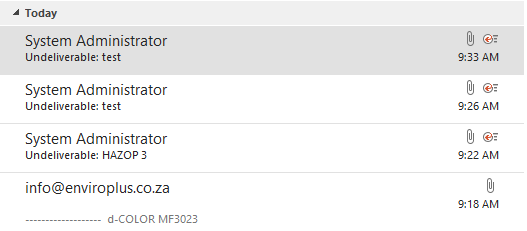
UPDATE: I phoned mweb and it turns out my email was blocked because someone tried to log in too many times with an incorrect password. They have now unblocked and changed my password.
2 Likes
Need to get a laptop or tablet for around 5k, anyone have any recommendations?
Have a couple of students using a version of this HP 250. See it currently on sale on Takealot. It’s not going to get you online gaming in competitive FPS, but it manages okay with the basic office and internet stuff for student types. Their biggest gripe with it is the small SSD and that it’s “a little slow sometimes”.
HP 250 G10 15.6" Celeron N100 8GB 256GB SSD Dark Ash Win 11 Home Notebook.
If there is a bit extra in the budget, it may worth looking for one with a bigger storage drive and maybe a drop more RAM.
Here it is on Wootware - a little more expensive for the standard, but with options for drive and RAM:
As always, shop around a bit, and check some reviews before buying. GL!
moved post here for more visibility and thoughts of the tech savvy MEWs who don’t visit the TK thread regularly.
2 Likes
That looks like a great option. Come to think of it, I don’t think I have used a Windows machine in approx. 10 years. Thanks for the recommendation.
1 Like

That looks pretty standard for Firefox according to my task manager.

2 Likes

Wow! 
I thought Chrome was a hog, have the tables turned?

1 Like

15 meg 
I don’t typically run anti-virus on my MacBook (often has componay policy tools/software on it), but what AV software is considered best to use on a free tier nowadays that I can load on my wife’s Windows laptop?
Edit: In the past I use to run Avast, but that was >10 years-ago.
Assuming it’s a newer machine with Windows 10/11 installed, the built-in Windows Defender/Windows Security tool is more than adequate these days for most standard users. It’s all I’ve used for at least the last 5+ years and I haven’t had any virus issues at all in that time. And I’m a perpetually online user running a ridiculous number of active email accounts.
It’s not going to beat out some of the more high powered commercially available programmes, but it’s a solid security tool that’s included in Windows anyway.
https://www.pcmag.com/reviews/microsoft-defender-antivirus
ETA - AV-TEST gives it a perfect 18/18 - one of a number of AV programmes to score that, but without all the irritating pop-ups and reminders and system draining background apps.
3 Likes
Thanks for the feedback, much appreciated.