And here I was thinking I might have a nice, quiet, laid back long weekend…
I never even considered the possibilities of a private server. Whole bunch of reading and website trawling ahead. I’m, luckily, not in a rush so it’ll be a nice distraction for a while. But will definitely track you down in your hidey holes when I’m a little more sorted. Thank you!
If you have an old PC lying around gathering dust, you can slap a linux distro on it and get started on experimenting with no cost.
There’s other hardware solutions, like Synology devices (mainly file servers), that might be better suited for beginners, and have all kinds of apps available, including Docker, which will run just about anything self-hosted these days.
Ollama + Open WebUI! I run Qwen 2.5 Coder 7B in 4 bit quant and Qwen 2.5 Instruct 1M also in 4 bit. Both incredibly useful for coding + writing support. My aging 3080 10GB works sufficiently fast, especially if I keep the context size down to around 16k. Sufficient for most tasks. Add in VS Code + Cline pointing to your local Ollama server and you don’t need fancy cloud subs like Cursor or Replit.
No GPU in mine, so really slow and overly creative, but still useful for POC’s and proving integrations. Someday I’ll track down a second hand 3080 somewhere, and pop it in for more AI power. I’ve got it working with N8N, which is a triumph in and of itself. Next up is to generate creative messages in home assistant - some great examples on Reddit of Ring camera object recognition triggering a screenshot upload to AI to describe the scene in condescending or sassy or humourous ways.
VRAM trumps processing, so find one with the most and fastest memory you can find. An RTX 4060 Ti 16GB is a nice sweet spot. Then you can offload the processing to Vast.ai to generate some passive income with the GPU.
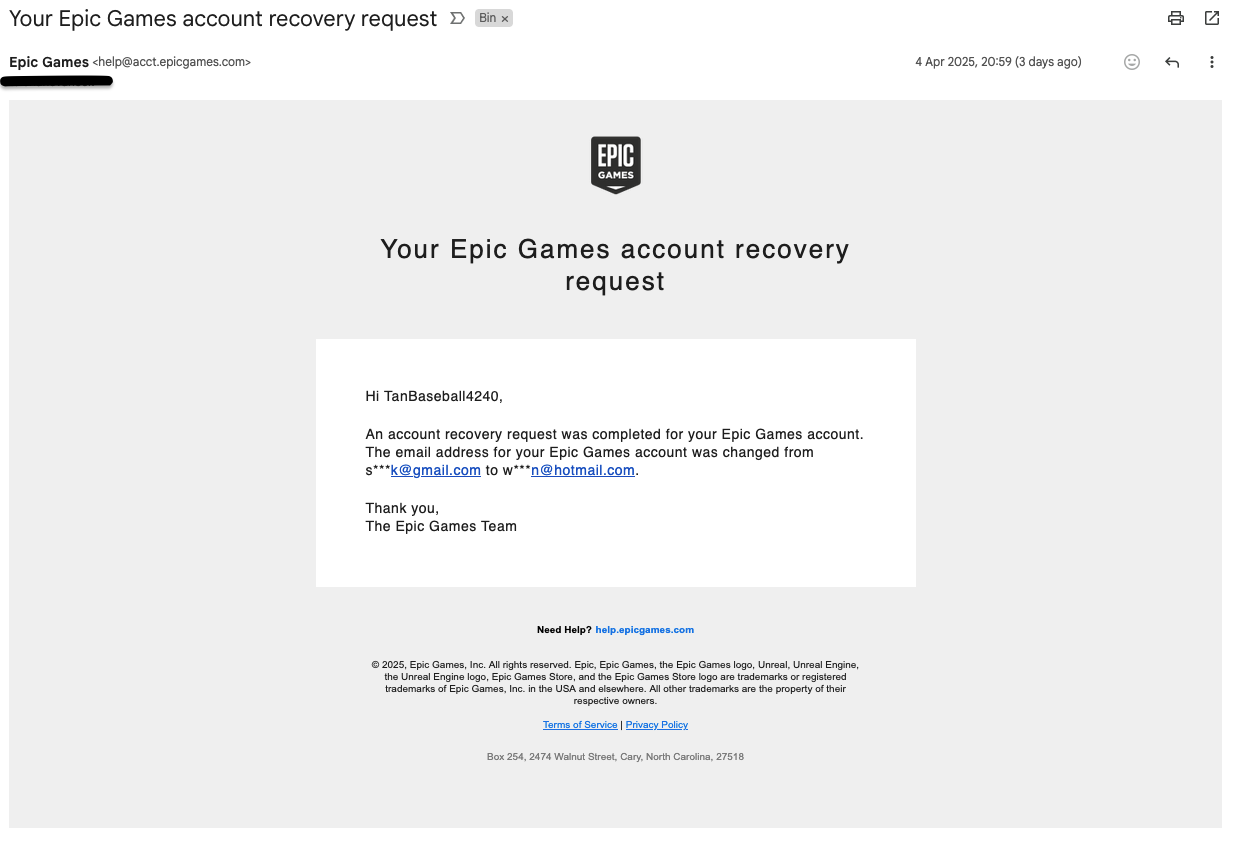
As we can see, this doesn’t seem to be phishing; it appears to be coming from a legitimate source. When I perform any activity on my account, this is the same email that Epic sends from.
My email address is unchanged When I logged into my account following this mail.
My 2FA is in place and when I perform any sort of security action on my account, it requires authentication either via email, text, or authentication app—I have never received anything 2FA-related for these “suspicious” activities.
I am unable to find any revelance to the mentioned email anywhere in my account options or settings.
I have logged out all sessions previously, and again following this email this morning.
I have downloaded my account information and scanned through it and have not identified any suspicious transtions or history. All activity appears to be my own and my IP.
So yeah, not sure if I should be cautious or concerned, but I cannot see anything out of the ordinary. Should I be worried?
I would be curious to see where the hyperlinks on the email points to. Like, they might make this email seem as legit as possible, and in a panic you click the Epic help link just below, but it takes you some place else where the real scam begins?