Our Synology has its own RAID technology it uses called SHR, don’t know if yours does the same. Here is a link to their knowledge base explaining it:
2 Likes
Reddit seems to think your machine is a bit light in the pants, but I would probably have tried pulling up a docker container anyway, just to try it!
3 Likes
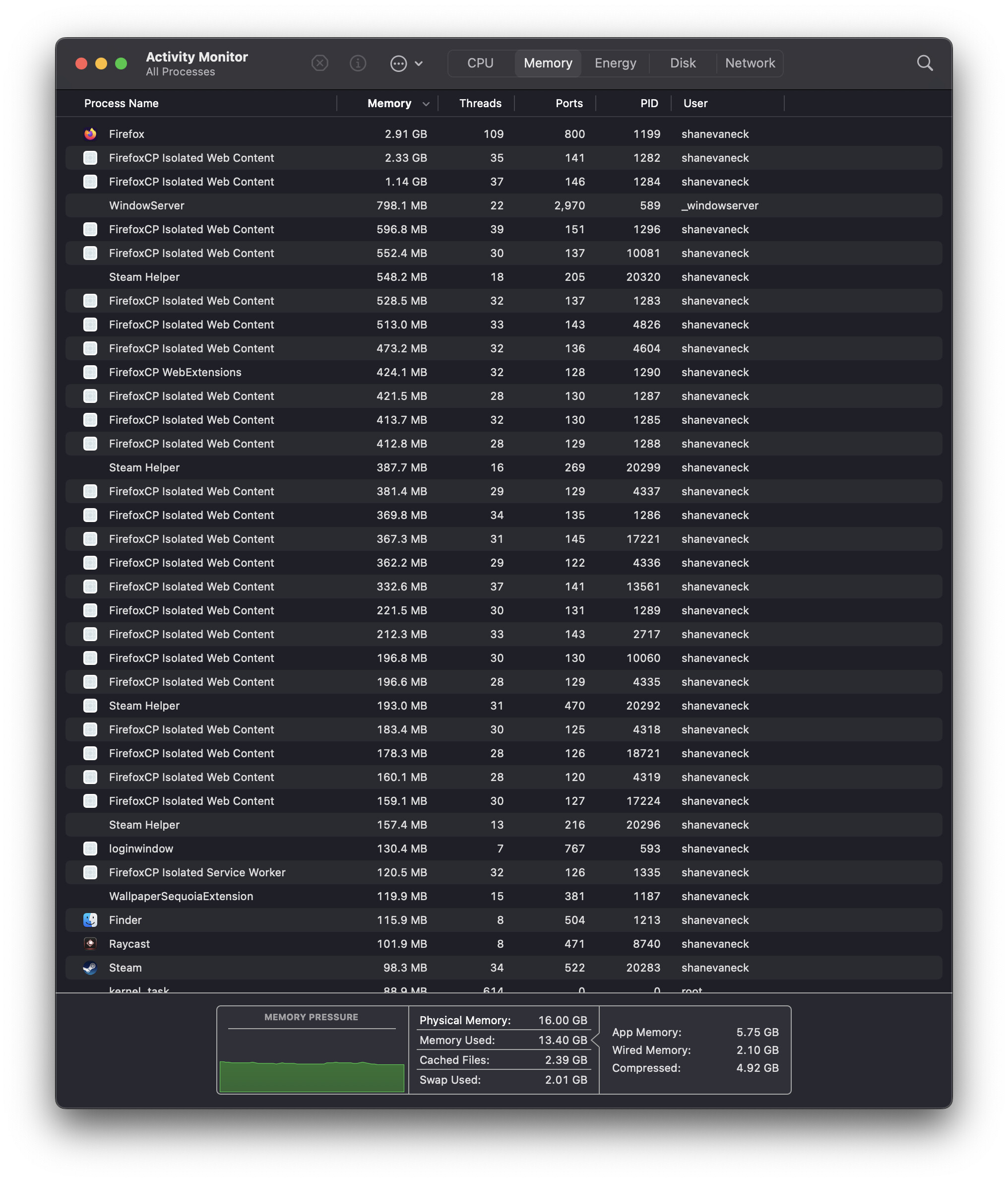
Same, firefox has been getting worse and worse over the years, to the point I am now slowly switching over to chrome, I have 24 tabs in chrome open at the moment, and it is not even using 2GB of RAM, Chrome’s ability to put a tab as “inactive” really really helps save on resources, where as firefox seems to keep everything running full speed, leeching so much of my PC resources.
I can’t even watch youtube on firefox anymore, as youtube just becomes unresponsive. Now, the conspiracy theorist in me wants to say its due to google owning youtube and they are doing something sneaky to slow down youtube on other browsers, but that is just hearsay and I have no basis for that.
2 Likes
Yeah, this is what led me to post here. It’s not that it was unresponsive, but it would take about 3 seconds for my cursor to change to a hover state.
I’m even going to the extent of considering a factory reset (format) on my Macbook.
Edit: I am really trying to resist going back to Chrome. Perhaps I should commit to Safari. I have just been using Firefox for so long that it is hard to give up on them.
I don’t know what’s wrong with your FF then. I usually have over 1000 tabs open
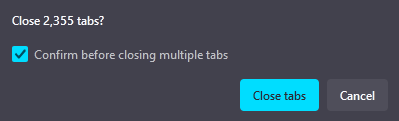

I’m running a portable, 64-bit version. FF doesn’t load all the tabs ofc, (neither does chrome), so most of those 2000 tabs are inactive. But I do like being able to scroll through them.
I still do use Chrome and Edge for work and streaming. FF is more for the extensions it has.
2 Likes


Good griedf!  That must have taken some force.
seen that kind of damage before. thats usually a case of ethernet cable laying in the walking path, and someone got their foot/leg under/around it and essentially "yanked’ it as they walked. hopefully rest of pc didnt go flying as well 
Fortunately that also looks like a adapter card anyway, so can be replaced…if it was onboard that might have been more of an issue. Is that a SFF pc?
yes it is, that PC was inside a network cabinet. After removing the copper plates that broke off from the cable in the network card, it actually worked fine and is now running without issue which is quite lucky.
1 Like
Rather odd one from me,
I have a Samsung A73, untill monday all calls I could do via bluetooth devices aka car and earphones, now I cannot - not normal calls, teams calls or whatsapp calls - it just wont let me select bluetooth.
I have reset the settings, I have deleted all paired devices and readded them still nope.
Ok I am assuming no one else has this issue 
Ai sorry man, I don’t use Bluetooth for anything, nevermind calls, my knowledge of this would pretty much end at “have you tried turning it off and on again”
Its not a strange permission issue all of the sudden perhaps? like does the device that you are trying to use for calls, have call permission or anything like that perhaps? with these days security updates, phones are always busy changing permissions for stuff.
Its ok, I had to reset some settings and then reconnected all devices and now its happy!~
3 Likes
Looking for recommendations for (ideally, Free For Personal Use) remote control tools.
Have used TeamViewer successfully in the past, but frustratingly, cannot get it to work anymore - it just plain refuses to wake my desktop and won’t connect. TeamViewer is set up and running correctly on both machines, the devices are linked and authorised on my account, Wake on LAN settings in the application and in BIOS are on.
My use case is a simple one laptop ↔ one desktop thing. I want to be able to wake my desktop and control it remotely without having to walk someone at home through the process of establishing a connection each time. Dont need fancy bells and whistles, just basic remote control.
2 Likes
I assume you don’t have a server running somewhere, hey? There’s a self-hosted option with Rustdesk https://rustdesk.com/, but even still, wake on LAN only works on the local network, which is also the case for AnyDesk
2 Likes
Yeah, this. Wake On Lan (WOL) typically needs a separate, awake device on your LAN to send the magic packet. Sending it from outside your LAN should be blocked by your router firewall.
Options are:
- Run a home server. It’s fun playing with /r/selfhosted services! Use this to send a WOL packet. Downside: Hardware is $$$$.
- Run a tiny home server. Same as above, but less powerful hardware like a Raspberry Pi. Lots of fun learning about Linux and SBC’s. Downside: A little $$.
- See if your router can send the WOL packet. Then you just need to be able to get it to send the packet remotely… Downside: Probably not supported.
- See if you can install Tailscale on your router to provide a VPN for your devices. This will trick your laptop into thinking it’s on your home LAN, so you can WOL from your laptop. Not sure how many routers supports Tailscale, though… Downside: Maybe not supported.
- Keep the desktop running. Downside: Eskom.
- Other options I’m not smart/creative enough for.
3 Likes
Thanks guys - hugely helpful resources. Looks like I’m going to need to investigate setting up an always on machine of some sort. Might well be the trigger to eventually get around to sort out a Plex server solution…
2 Likes
So, own opinion incoming. An opinion flavoured by doing this sort of thing as a hobbyist for ~15 years, mind you.
Don’t go Plex. They have a brilliant client for most televisions/set top boxes, and slick login making sharing simple, but the server side is seriously lacking.
- About a year ago, without consent, Plex sent out emails to all registered users showcasing what other users were watching on servers they had in common, including seriously NSFW titles.
- Bloat. Plex has all sorts of extra little tidbits bolted on that is useful to a tiny minority of users. I don’t want podcasts in another platform!
- Offline capability. When I still ran Plex in 2017, my internet went out for a week. For some reason, Plex decided that because it can’t phone home, I can’t watch offline media over my LAN. It has an “offline streaming” feature, but it simply did not work.
- Paywalls everywhere.
I use Jellyfin. It has its own issues, mostly with subpar transcoding support on the Android TV app, but I’ve never wondered if it’s phoning home, telling others what I’m watching, or looking around to find my credit card details. There are other alternatives as well, like Emby, for instance, that are better than Plex.
When you get to the point of looking for hardware, and want to have a chat about all this, let me know, I’ll happily talk through all the pro’s and con’s of my experiences, here, whatsapp, discord, you know where to find my lurking butt.
3 Likes
Forgot to mention that with your own server, you open a whole kettle of fish of services you can host yourself. Highlights from my own services:
- Audiobookshelf: Listening to legally obtained audiobooks.
- Changedetection: My server polls several websites every 3 or 4 hours to see if something changed. Brilliant for watching prices on ecommerce sites, announcement sites, and job boards.
- Cloudflare-ddns: Updates my cloudflare account to ensure it’s always pointing at my actual IP address
- Emby: Media server kept on as backup
- Factorio: Game server!
- Frigate: AI identification of objects in a video stream. Mine’s broken currently, though, I believe because TP-Link camera’s are meh.
- Gitea: Selfhosted git server for my code that I don’t want Copilot to co-opt. Mostlly because I’m a terrible coder.
- Home Assistant: Forget Homekit. Home Assistant does all my home automation, with minimal cloud requirement.
- Jellyfin: As discussed.
- metube: Ever wanted to save a Youtube video to watch in any media player later?
- moquitto: MQQT server that I barely use and really should put more effort into.
- n8n: Workflows and integrations, all on my own server. Go take a look at how powerful this is!
- ntfy: Send notifications to my phone
- nzbget: Acquire those legal audiobooks.
- ollama: Selfhosted AI. I don’t have the GFX for this, so it’s slow, but it’s fun to explore this new tech without shelling out of tokens to Google and OpenAI.
- openwebui: Web frontend for ollama.
- radarr and sonarr: Help feed nzbget.
- smokeping: Keeps pinging websites all day, so that I can see when my fibre line is stuffed.
- Stirling: PDF engine, so that I don’t need Acrobat installed anywhere
- tdarr: Transcodes all my media to the right codecs.
- ttrss: My own RSS reader, with my own curated news, that I care about.
4 Likes